
I’m in the throes of target host recon for another pentest, and thought I’d share some workflow / automation stuff.
In the past, I’ve discussed using historic DNS “mining” to collect target hosts in the domain.
I thought I’d share some work on using the favicon.ico methods to expand on that. Jan has an excellent diary on this here: https://isc.sans.edu/diary/27326
The “favicon.ico” file is the 16×16 pixel icon that shows up in the tab view for any particular host. The trick here is that many organizations mandate the same file for all of their hosts, which means that you can often find hosts that should be in the scope of your engagement, but don’t show up elsewhere.
To get the favicons.ico hash value from a site, this one liner is the way to go for me (windows CMD version shown):
rem FAV.CMD
rem extract favicons.ico hash value from target website
@echo off
curl -sL https://%1/favicon.ico | python -c “import sys, base64, mmh3; print(mmh3.hash(base64.encodebytes(sys.stdin.buffer.read())))”
Let’s look for a decent target. Normally I’d pick sans.org, but it looks like SANS (intentionally I am sure) uses different favicon.ico files across their sites, they have multiple brands, plus they’re wise to this recon method. So, let’s run this for some other domain, let’s choose www.canada.ca:
fav www.canada.ca
-1830416802
Now, we want to query shodan to find other hosts with this hash value, so from the web interface you would use “http.havicon.hash:-1830416802”
This gives us an unwieldy list of hundreds of hosts, organized by IP address but with a myriad of info for each IP. What we really want in today’s cloud-infrastructure world is the list of hostnames – how do we get that?
Let’s go to Shodan’s API, and query from there. Since we’re of course going to do this in a repeatable way for future engagements, let’s script this too:
rem SHODAN-FAV
rem search shodan.io for favicon.ico matches
curl -s -k “https://api.shodan.io/shodan/host/search?key=%APIKEY_SHODAN%&query={http.favicon.hash:%1}
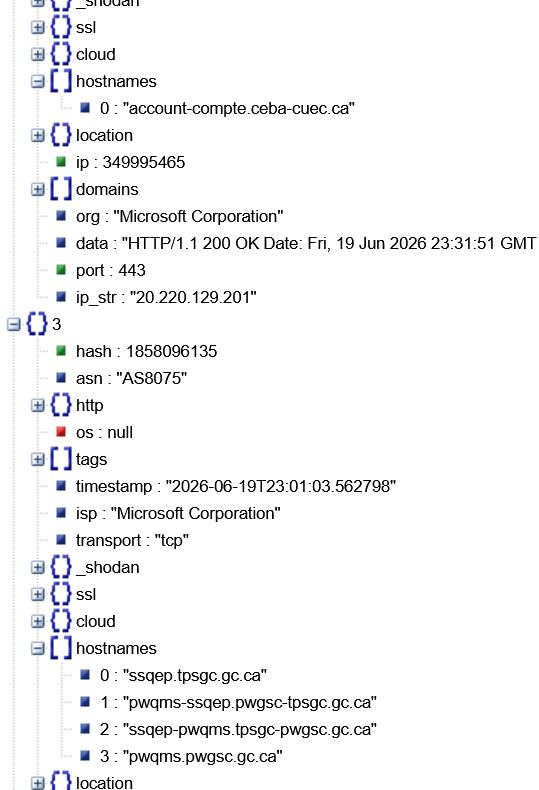
So, for our value, this returns a HUGE file of 6MB, which I won’t show in it’s entirety here. A snip though, run through https://jsonvierwer.stack.hu (just because I find it a nice, readable output) is:
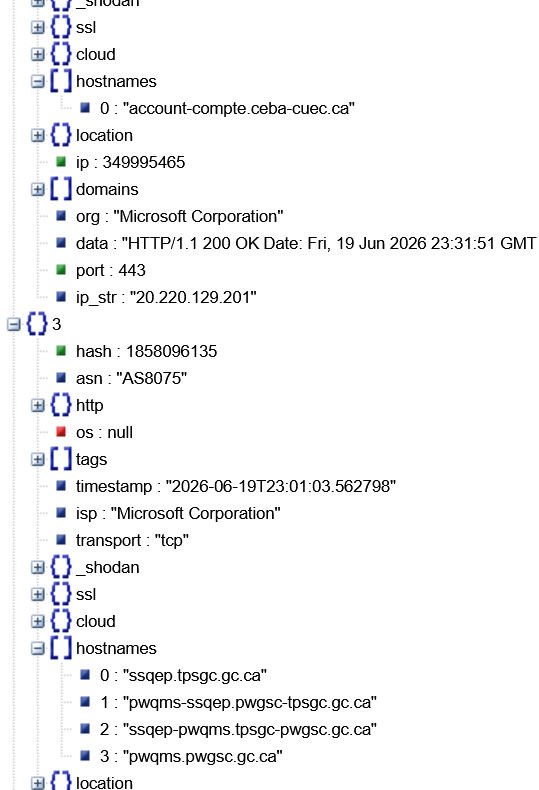
So in the output file, we want the “hostnames” arrays in a text list, suitable for nmap or any other tool that wants a list of hosts as input. We see the hosts in groups, numbered sequentially.
So we want to pull the array values that are multiple levels “deep” in the structure, with arbitrary “parents” (in this case 0,1,2,3 …)
To query at arbitrary / recursive depth, use the “..” query method in jq
So, in our use case, it would be:
type fa.out | jq -r “.. | arrays[].hostnames?” | more
Which gives us:
[
“www.cfc.forces.gc.ca”,
“www.cfc.dnd.ca”
]
[
“ip150.ip-51-79-10.net”,
“intercultures.ca”
]
[
“account-compte.ceba-cuec.ca”
]
[
.. and so on
Next step is we need to distill this down to just a plain list of hostnames, so let’s delete those brackets, commas, spaces and quotes. We also have a number of “null” hostnames, let’s get rid of those:
cat fa.out | jq -r “.. | arrays[].hostnames?” | grep -v null | tr -d “,” []”
running it all through a standard sort / uniq filter gives us a final list:
cat fa.out | jq -r “.. | arrays[].hostnames?” | grep -v null | tr -d “,” []” | sort | uniq
8fb29c57162d4e1c.com
94-158-245-105.mivocloud.com
account-compte.ceba-cuec.ca
accreditationcanada.gc.ca
acsta.ca
acsta-catsa.gc.ca
acsta.gc.ca
ai-answers.alpha.canada.ca
apostille.canada.ca
asc-csa.gc.ca
aus.vet
autodiscover.rmc.ca
banting.bourses-fellowships.gc.ca
… and so on
We can see a few false postives, also a number of hostnames that are duplicated later with a “www.” prefix, but for the most part we’re bang on!
So what’s the final hostname count?
cat fa.out | jq -r “.. | arrays[].hostnames?” | grep -v null | tr -d “,” []” | sort | uniq | wc -l
363
With a few manual edits, this gives us a sorted list of hostnames that we can use for nmap or whatever tool. For instance:
nmap -sT -p443 –open –resolve-all -iL fav.out
Not surprisingly, this gives us a number of “could not resolve” errors right off the bat. Let’s get the list of all hostnames that failed to resolve (for our report):
nmap -sn –resolve-all -iL hosts.in | grep “failed to resolve”
More to the point, let’s get the list of IP addresses of the hosts that resolve and return a reply for an icmp echo request:
cat nmap-out-1.gnmap | grep Up | cut -d ” ” -f 2 > hostips.in
So now we have 363 hostnames, which resolve out to 373 IP addressees. Not a great ratio, but I expect that many of these will end up being load balancers, and don’t forget the hostnames that have both “sitename.gc.ca” and “www.sitename.gc.ca” names.
Now we can get a more useful list – find all of the open ports on all of the target hosts (using the IP addresses, not the fqdn hostnames). Be sure to do this immediately – you might find that some of these – especially things like api gateways and other cloud “service” targets – will change fairly frequently. Let’s pipe it in to masscan for a full list of tcp ports that are open in our target list:
masscan -sT -p0-65535 –rate 2500 –open -iL fav.out | tee tcp-open-ports.out
cat open-ports.out| wc -l
5091
Goodness, that’s a list! For 363 hostnames, which resolved out to 373 IP addresses we found 5091 open ports!
It’s possible that some of these IP’s are honeypots (never believe what the tools tell you without using your human eyeball model 1 one mark 1), but that still gives us a nice target list for further analysis!
Stay tuned, my next post will be more recon using DNS.
===============
Rob VandenBrink
[email protected]
(c) SANS Internet Storm Center. https://isc.sans.edu Creative Commons Attribution-Noncommercial 3.0 United States License.