
Anyone who deals with phishing messages caught by basic security filters knows that most phishing samples tend to blend into one another, since only a small set of techniques and approaches keeps reappearing in them. That is precisely why it is worth pausing on the occasional message that does something a little out of the ordinary.
One such unusual message was caught on Tuesday by an e-mail security solution used by one of my clients. At first glance, both the e-mail body and the attached credential-stealing HTML page looked entirely generic, however, the fact that the attachment was fairly large, and that Outlook claimed the date on which the e-mail had been sent was “None”, caught my attention and made me take a second look… Which was fortunate, because it appears that the large size of the attachment might be connected to the increasing role that AI is playing in e-mail security in an interesting way.
Before we get to the attachment, however, the phishing message itself deserves a brief mention, since several small details in its headers suggest that it was not sent through any normal mail path, but rather generated by a simple, homemade script.
The e-mail presented itself as a Microsoft Teams notification about a document shared over SharePoint, with another document attached directly to the message (note the text “None” in the upper right corner where a date should be).
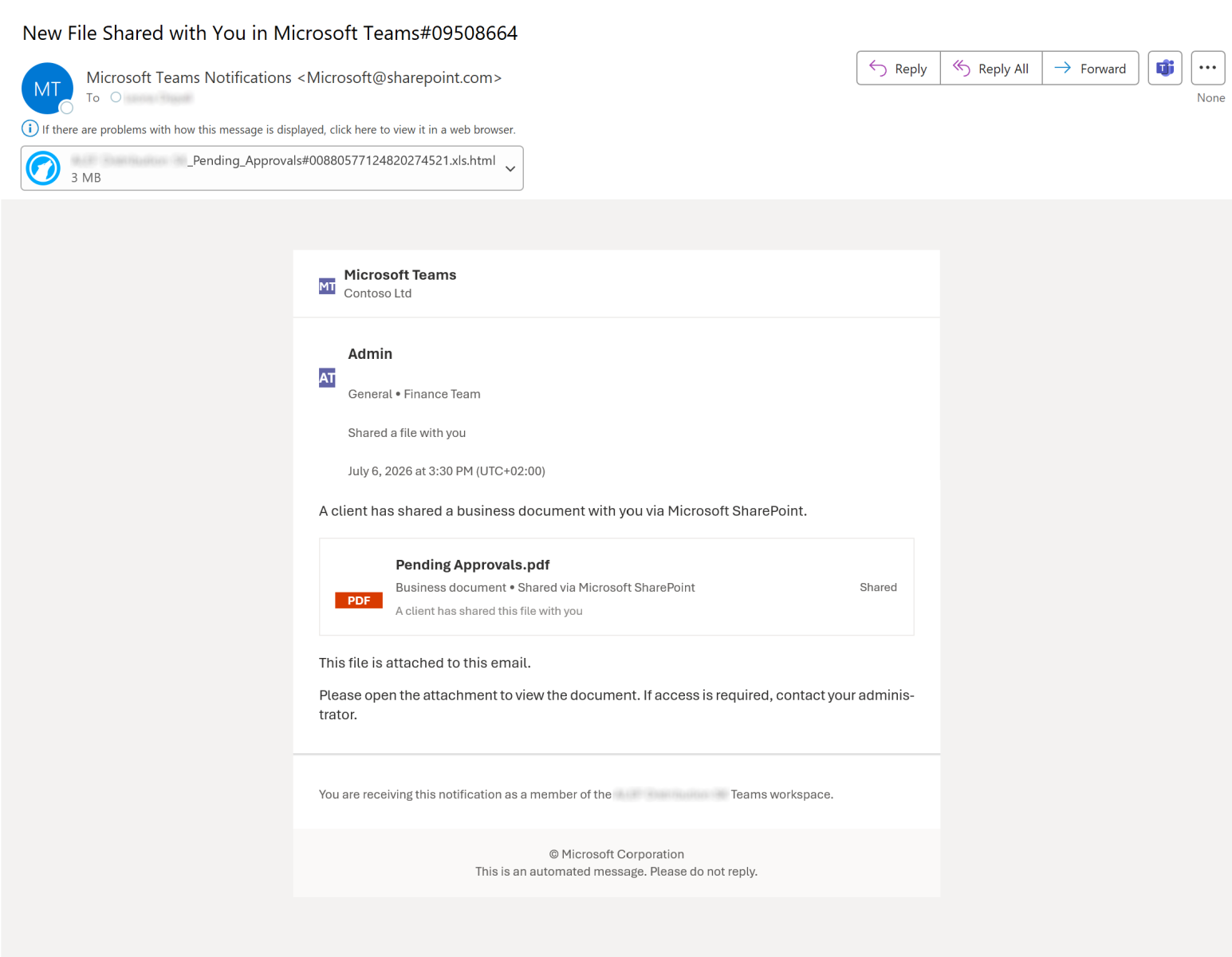
As you can see, the “From” header claimed that the message came from “Microsoft Teams Notifications <[email protected]>”. Unsurprisingly, this actually wasn’t the case…
When looking at the headers, three interesting points stood out:
- It turned out that the envelope sender was empty (i.e., “MAIL FROM:<>” was used). In principle, the use of an empty envelope sender – which is called a “null reverse-path” – is perfectly legitimate[1]. It is what bounce messages are supposed to use, so this was not a violation of any standard. It did, however, mean that there was no envelope domain against which SPF could be evaluated, which is why the receiving system fell back to the “HELO/EHLO” identity and ended up checking “postmaster@[10.88.0.3]” – i.e., an internal/RFC 1918 address presented by the sending host (which was actually hosted on the public IP 35.195.254.112 in the Google Cloud). Since we mentioned SPF, it is worth adding that no DKIM signature was present either (for obvious reasons), and that DMARC evaluation therefore unsurprisingly failed.
- The message carried no “Date” header whatsoever, which was the reason for the “None” date shown by Outlook. Unlike the empty envelope sender, this is against standardized requirements, as RFC 5322 requires an “origination date” field to be present[2]. A message put together by any normal e-mail client (or sent through a normal e-mail server) would essentially always have one, so its absence is telling.
- The “X-Priority” header was set to 0. This header was never formally standardized in an RFC, but per Microsoft’s specification[3], which is the de-facto authority for it, only the values 1 (highest) through 5 (lowest) are defined, so a “0” is outside the meaningful range.
While none of these oddities were especially remarkable on their own, taken together they painted a fairly clear picture of the tooling used to send the message – it was most likely a homemade script that interfaced directly with a receiving e-mail server and handed the message to it, without any standard e-mail server being involved on the sending end.
With that out of the way, let’s take a closer look at the attachment.
The attached file was named “<name of company>_Pending_Approvals#<digits>.xls.html”, and its most immediately noticeable characteristic (besides the double extension) was its size. At 2,589 kB, it was significantly larger than one would expect a self-contained HTML phishing page to be, since these usually take up no more than a few tens (or at most hundreds – if images are included) of kilobytes.
The reason for this became clear as soon as the file was opened in a text editor. The entire contents were wrapped in a single layer of trivial obfuscation – the whole page was stored as a long sequence of “uXXXX” escapes and handed to the “unescape()” JavaScript function inside a “document.write()” call.
<script type="text/javascript">document.write(unescape("u003cu0021u0044u004fu0043u0054u0059u0050u0045u0020u0068u0074u006d
...
u0058u0058u0058u0058u0058u0058u0058u0058u002du002du003e"));</script>
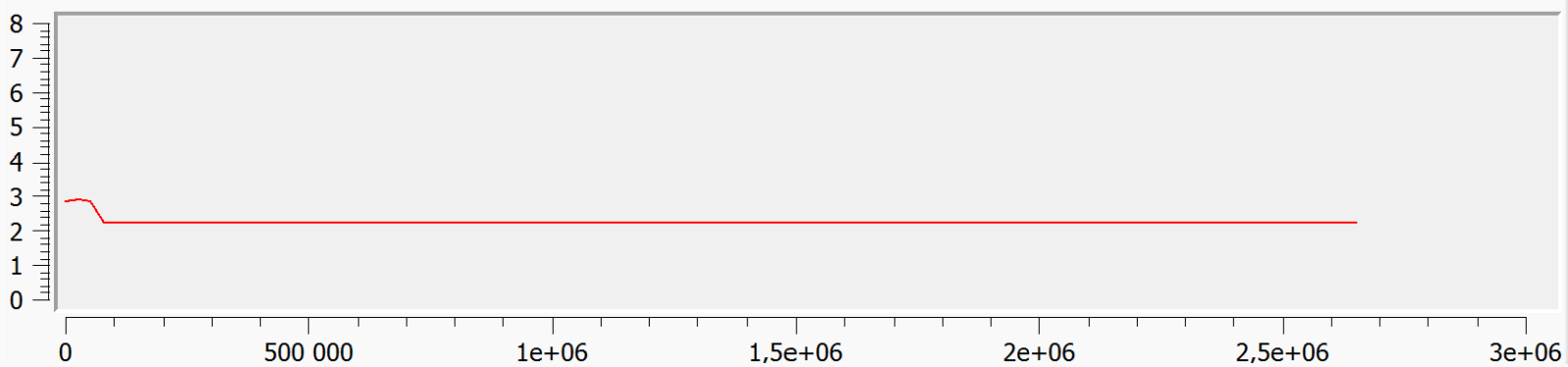
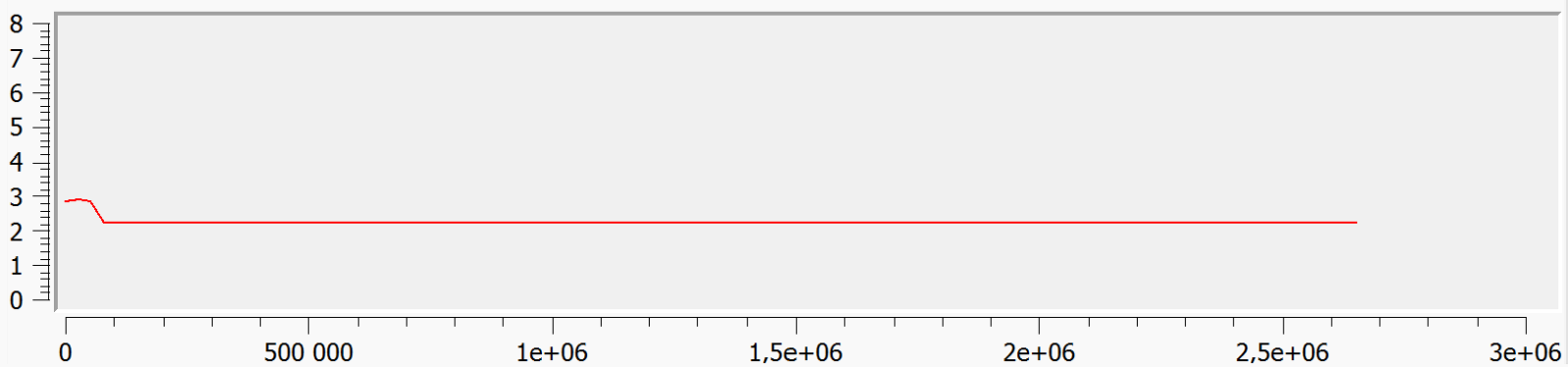
Once the escaped string was decoded, only 431 kB of HTML were left. Of that size, though, only the first 11 kB or so constituted an actual, working phishing page, while the remainder was padding. This padding was placed after the closing “</html>” tag and was made up of a single HTML comment containing a little over 430 thousand copies of the letter “X” (originally encoded as “u0058”, which you can see above).
It is worth pointing out that the file size was, in effect, “inflated” twice over – first by the aforementioned ~420 kB comment, and then by the “uXXXX” encoding, which stored each character (padding included) as six bytes. Between the two, the block of “X”s ended up accounting for something on the order of 2.5 MB, i.e., roughly 97 % of the entire file.
While phishing pages bloated with large quantities of copy-pasted, unused content are not new[4], in this case the padding is interesting because of what it might have plausibly been aimed at.
The classic reason for padding malicious files is covered by the MITRE ATT&CK “Obfuscated Files or Information: Binary Padding” sub-technique[5]. In short, threat actors may append a large, low-entropy blob to a file in order to push its size past the maximum that anti-malware engines are configured to scan, while keeping the file easy to compress (and therefore still convenient to deliver). While not as common as run-of-the-mill obfuscation, malware using this technique can be found in the wild reasonably often[6,7].
This sub-technique, however, does not quite fit our sample. Even leaving aside that the attachment is padded using a comment rather than a binary blob, at 2.5 MB the file falls well short of the scan-size limits used by present-day e-mail security solutions, which usually process attachments well into the tens of megabytes.
The padding is also about as low-entropy as any data can get, which means it wouldn’t help the file blend in with benign content on a statistical level either (if anything, a huge block of identical bytes would be trivial to spot and would make the file look more anomalous, not less). Whatever the padding is meant to defeat, in other words, it does not appear to be the sort of size or entropy-based checks that techniques traditionally used in phishing try to bypass…
One thing that has changed in the area of e-mail security over the past couple of years, though, is that a growing number of solutions have started to incorporate some form of NLP or AI-based mechanism for assessing message content, and this is where the padding might begin to make sense.
Earlier this year, KnowBe4 described a phishing technique they refer to as “NLP obfuscation”, in which malicious content is placed at the start of a message and then buried under a large amount of benign-looking filler[8]. According to their analysis, this can shift the “probability scale” that some content-classification models rely on – basically, if a message contains enough innocuous material, the weight of the malicious portion can be diluted to the point where the model no longer flags it with sufficient confidence. The same bulk can also make a message large enough so that scanning it using AI-based mechanisms takes too long, leading some solutions to release it rather than delay delivery indefinitely.
Although our attachment doesn’t fully match the samples described in the aforementioned analysis (the filler here is a single repeated character rather than natural-looking text) its overall structure (i.e. payload first, followed by filler) is the same.
If some form of AI or NLP-based content assessment was indeed the intended target, the padding would work not by disguising the “malicious” portion of the HTML file, but simply by drowning it out. Whether the message was scored by a traditional content classifier or passed to an actual LLM, the genuinely malicious portion would end up as a tiny fraction of a large, low-information whole, which might have been enough to pull an averaged or probability-based verdict below the threshold at which the message would be blocked. And since the bulk of the file carries no meaning, the same padding may serve a second, cruder purpose – inflating the sheer volume of data (and, for an LLM, the number of tokens) that has to be processed to the point where a scanner working under a per-message time or size budget would cut its analysis short, or skip it altogether[9].
Of the two, the second goal strikes me as the more likely one here. It is consistent with where the padding was placed – after the payload, where it does nothing to actually conceal the malicious portion of the HTML code – and it is the one objective for which a featureless block of “X” works just as well as carefully crafted filler, which would also explain why the author saw no need to use anything more elaborate.
I should stress that all of the above is, ultimately, only an informed speculation – short of asking the author of the phishing, there is no way to know for certain what they had in mind. It should also be said that, against any reasonably capable model, a solid block of a single repeated character would be a blunt instrument at best, since it is trivially recognizable as padding (see the entropy chart below).
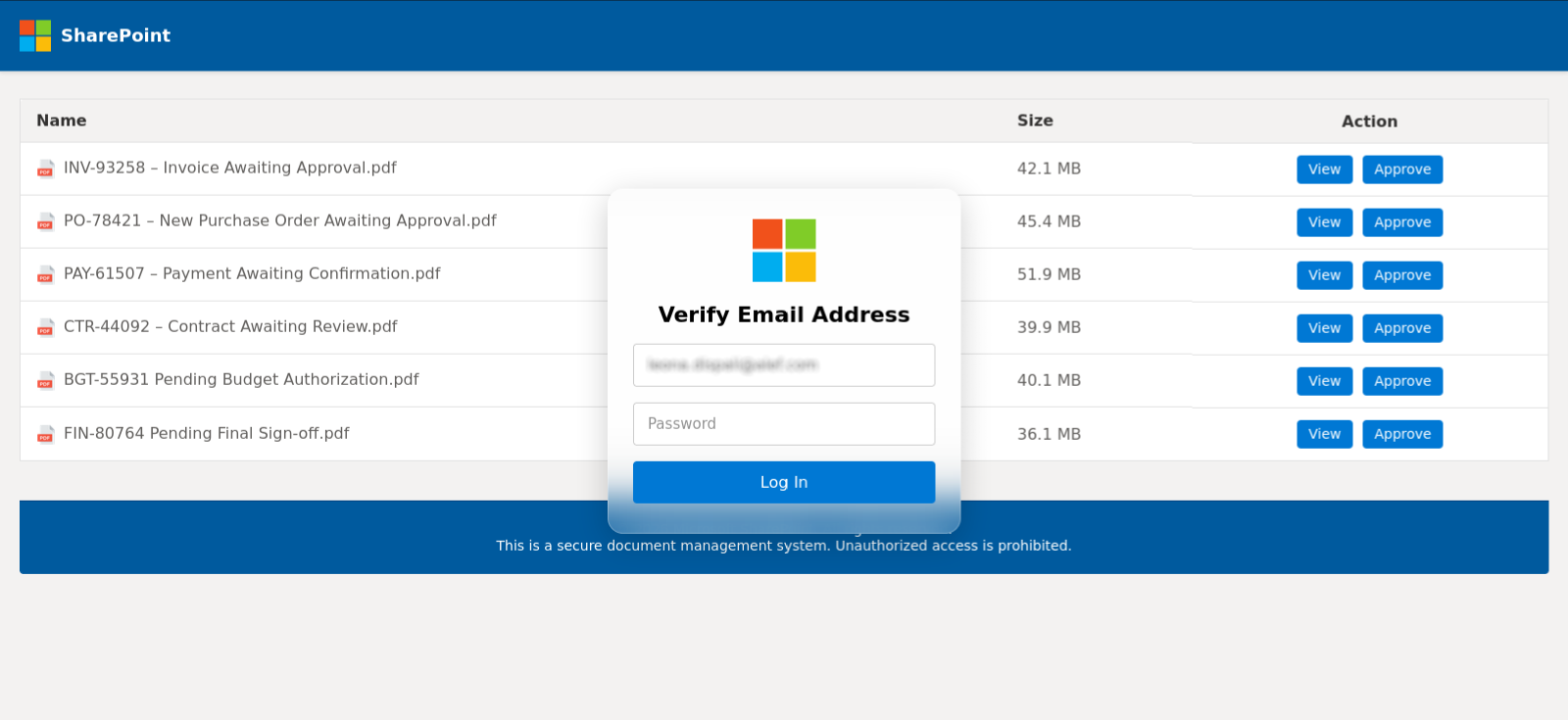
For the sake of completeness, it should be mentioned that the functional part of the attachment was an otherwise unremarkable SharePoint-themed credential-harvesting page. It attempted to load the recipient organization’s logo dynamically through the Clearbit logo API, though, as the figure below shows, the lookup failed and a placeholder (image with Microsoft squares) was displayed instead… Which is unsurprising given that the free Clearbit logo API was shut down at the end of 2025[10] – this in itself is a small sign that the page was assembled from older, borrowed or LLM-generated code. Any credentials that were entered would be submitted through a POST request to the Formspark form-handling service[11], which was being misused as a convenient data collection point. The page additionally contained a routine that intercepted the developer-tools and view-source keyboard shortcuts – a trivial and fairly common anti-analysis feature[12].
[1] https://datatracker.ietf.org/doc/html/rfc5321#section-4.5.5
[2] https://www.rfc-editor.org/rfc/rfc5322.html#section-3.6
[3] https://learn.microsoft.com/en-us/openspecs/exchange_server_protocols/ms-oxcmail/2bb19f1b-b35e-4966-b1cb-1afd044e83ab
[4] https://isc.sans.edu/diary/32510
[5] https://attack.mitre.org/techniques/T1027/001/
[6] https://isc.sans.edu/diary/26464
[7] https://isc.sans.edu/diary/30524
[8] https://blog.knowbe4.com/nlp-obfuscation-techniques-email-security-evasion
[9] https://genai.owasp.org/llmrisk2023-24/llm04-model-denial-of-service/
[10] https://developers.hubspot.com/changelog/upcoming-sunset-of-clearbits-free-logo-api
[11] https://formspark.io/
[12] https://isc.sans.edu/diary/30412
———–
Jan Kopriva
LinkedIn
Nettles Consulting
(c) SANS Internet Storm Center. https://isc.sans.edu Creative Commons Attribution-Noncommercial 3.0 United States License.